Appointment reminder software (how to choose one)
Appointment reminder software cuts no-shows by confirming visits before they happen. Here is what it does, what to look for, and how to pick the right one.
On this page
- Appointment reminder software sends an automatic message before a booked visit so fewer customers forget to turn up.
- It only fixes forgetting. It does nothing for the customer who finished a visit and never booked the next one.
- Judge a tool on timing control, two-way replies, what happens after a reply, and whether reminders are tied to your actual booking calendar.
- A standalone reminder app adds another login. A reminder built into the system that holds your bookings does not.
Appointment reminder software automatically sends a message to a customer before a booked appointment, usually by text or email, so fewer people forget to show up. It reads your booking calendar, waits until a set point before the visit, and sends the message without you touching it.
That is the whole job. It is a genuinely useful piece of software, and it is also narrower than most of the marketing around it suggests. This guide covers what it does, what to actually check before you pay for one, and the gap it does not close.
What appointment reminder software actually does
Strip away the feature lists and every one of these tools does the same four things:
- Watches your booking calendar for upcoming appointments.
- Waits until a configured time before each one.
- Sends a message with the date, time, and service.
- Records whether the customer replied or confirmed.
The differences between tools are in the details of those four steps: how precisely you can control the timing, whether the customer can reply, what happens when they do, and how much the whole thing costs per message.
Does it actually reduce no-shows?
It depends entirely on why your customers are not turning up, and that is worth being honest about, because a reminder only solves one of the reasons.
| Why a customer misses a visit | Does a reminder fix it? |
|---|---|
| They genuinely forgot | Yes. This is what reminders are for. |
| They booked weeks ahead and lost track of the date | Yes, especially with a second earlier confirmation. |
| Something came up and they did not know how to cancel | Partly, if the reminder gives them a way to reschedule. |
| They changed their mind about the price | No. |
| They had a poor last visit | No. |
| They never intended to come and booking cost them nothing | No. A deposit does. |
For routine local services booked in advance, forgetting is the large slice, which is why reminders are worth setting up. But if you are losing a lot of bookings, work out which row you are actually in before buying software aimed at the first one. We wrote a longer piece on how to reduce no-shows at your business that works through the other rows, and if you want the policy wording itself, our no-show policy template is written to be copied and pasted.
Seven things to check before you choose
Most comparison pages rank tools by price and message volume. Those matter least. These are the things that decide whether the software is still useful in six months:
Timing control. Can you set the lead time yourself, and can you send more than one reminder? A tool locked to a single 24-hour reminder is fine for a barber and useless for a service booked two months out.
Two-way replies. If a customer replies "can't make Thursday", does anyone see it? A one-way reminder that cannot be answered turns a reschedule into a no-show.
What happens after the reply. This is the one people miss. A reply is only useful if it changes the booking. Otherwise you are still retyping it into a calendar.
Whether it reads your real calendar. If the reminder tool holds its own copy of your schedule, the two will drift apart. Every reschedule then has to happen twice.
Cost per message, not per month. Text messages usually carry a per-message cost on top of the subscription. Work out your real monthly volume and multiply it out before comparing headline prices.
Sending rules in your country. Business text messaging is regulated differently around the world, and in several places you have to register before you can send at scale. Check this before you build a process on top of it.
Whether it is one more login. A standalone reminder app is a second subscription, a second copy of your customer list, and a second thing to keep in sync.
Reminders will not bring anyone back
Here is the limit of this entire category, and it is the reason we do not sell a reminder app on its own.
A reminder acts on an appointment that already exists. It protects a booking you have already won. It does nothing at all for the customer who came in, was delighted, walked out, and never booked again. That customer is not forgetting an appointment. They do not have one.
For most local service businesses that second group is much larger and much more expensive than the no-show group. The fix is a different mechanism: something that notices a customer is due for their next visit based on when they last came in, and invites them back before they drift. We make that argument in full in how to get repeat customers for a local service business, and the wider version, covering how the two fit together, is in our pillar piece on how local service businesses get and keep customers.
If you are choosing software right now, the practical takeaway is this: a tool that only reminds is solving the smaller half of your problem.
How we handle reminders at Growth Onward
Growth Onward is not a standalone reminder app. Reminders are one part of a system that also holds your website, your booking calendar, your customer list, and your payments, which is what lets the reminder read a real booking and lets a customer act on it in one place.
Two specifics worth knowing before you compare us to anything else:
- Our reminders go by email. Email costs nothing per message, carries the detail people actually want, and avoids both the per-message billing and the sender registration that business texting involves in a lot of countries. For the lead times most local services book at, it does the job.
- We send two different things. An appointment reminder before a booked visit, and a rebooking reminder to a customer who is due for their next one and has not booked it. The second is the one that grows the business. You can see how the recurring side is set up in our help guide on recurring visits.
Deposits are the other half of the no-show answer, and they are configurable per business rather than fixed by us. Our help page on how you charge walks through taking a deposit instead of full payment at booking.
Every business we run is a real, live site. This is one of them, a grooming salon running the booking flow that the reminders sit on top of:
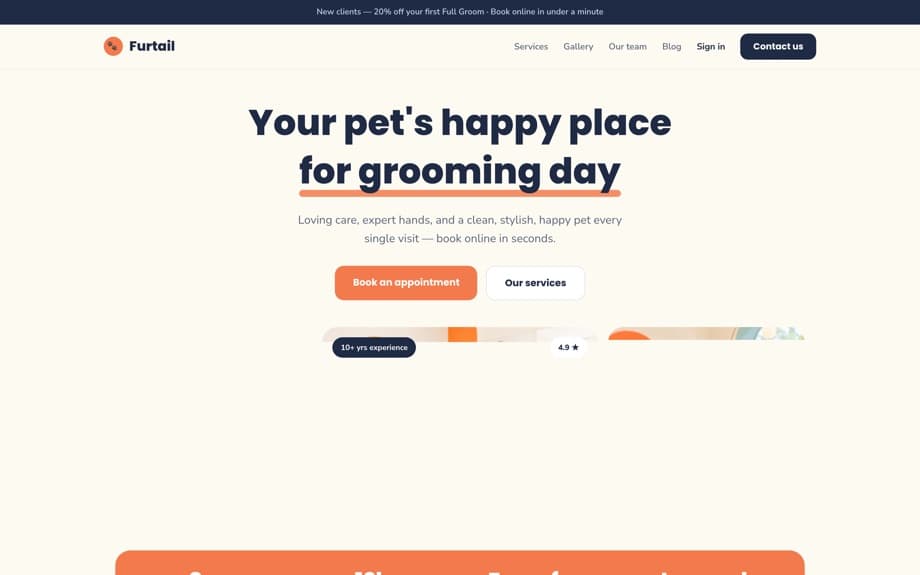
You can click through that one and four others on our demo portfolio, including the mobile versions, and book a fake appointment to see what the customer actually receives.
Choosing well
If your only problem is that people forget, a reminder tool will help, and a cheap one will help about as much as an expensive one. Spend your evaluation time on timing control, replies, and whether it reads your real calendar, not on message volume tiers.
If your problem is that customers come once and disappear, reminder software is the wrong shelf entirely. You need something that tracks when each customer is due and reaches out on its own, which is a different mechanism with a different name. Our page for grooming salons shows how we put both in one place, and the help centre documents how each piece is set up.